
• Home
  • About
  • Cloud Services
  • Rentals
  • Blog
  • Solutions
  • Contact
  • Sign In My Account
Menu

VFX TECHNOLOGIES : High Performance Computing

  • Home
  • About
  • Cloud Services
  • Rentals
  • Blog
  • Solutions
  • Contact
  • Sign In My Account
Mac Pro.jpg

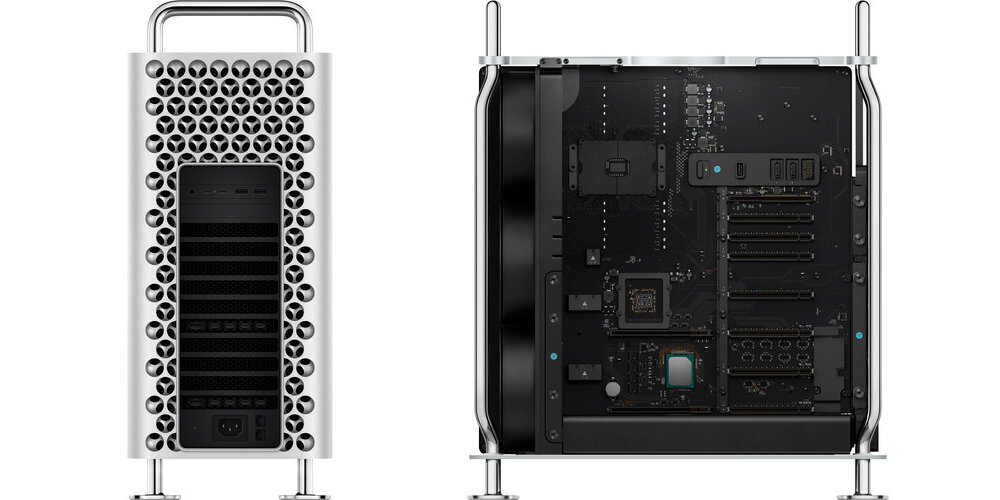
Our Thoughts On The New Mac Pro

February 24, 2020

Apple took the industry by surprise as they released their new version of the Mac Pro. Let's take a look at some of the interesting things we’ve found now that it’s been out for a couple months. 

As far as build goes, Apple has always been one of the best to do it, and they like to keep it that way by making it impossible to interchange any of the internal components. But with this new Mac Pro they have managed to do both. The build is extremely solid but also gives you the ability to swap out much of the internal hardware. And with their hardware being a bit overpriced, and “a bit” is an understatement, most users have been very adamant on getting the base model and swapping out almost all of the hardware.  

We’ve been in touch with some major studios and have the scoop on the most typical build a lot of these companies are going with. But with many of those components being replaceable, let’s also see how much money you could save by going with the base model and adding in the hardware from 3rd party suppliers. Let's compare: 

  • Typical Build W/ Apple Hardware Specs 

  • 3.2GHz 16‑core Intel Xeon W processor, Turbo Boost up to 4.4GHz = $2,000 

  • 192GB (6x32GB) of DDR4 ECC memory = $3,000 

  • Radeon Pro Vega II Duo with 2x32GB of HBM2 memory = $5,200 

  • 2TB SSD storage = $800 

  • Total = $16,000 

  • Typical Build W/ 3rd Party Hardware Specs 

  • 3.2GHz 16-Core Intel® Xeon® W-3245 Processor = $2,000 

  • OWC 6 x 32.0GB PC23400 2933MHz DDR4 = $1,250 

  • Radeon Pro Vega II Duo with 2x32GB of HBM2 memory = $5,200 

  • Samsung T5 2TB External SSD = $325 

  • Total = $14,775 

There are 3 things to keep in mind while building your own version. Firstly, as of right now, it’s best to stick with the GPU’s Apple provides for the most optimal performance. A lot of the Apple apps might have trouble running on 3rd party GPU’s although it is possible. The 2nd thing to keep in mind is that you can’t remove or replace the SSDs’ that come with the Mac Pro since they are tied into the T2 chip on the motherboard. The best option is to get the base 256GB and add your own SSD’s or even an NVMe RAID card for extra capacity and performance. And thirdly, having tried multiple NVME RAID cards in one chassis proves to be troublesome at the moment. This is something we are currently trying to configure but as of right now, we have not been able to run the Mac Pro successfully with more than one NVME RAID card at a time. With that said, just using one NVMe RAID, the results are still very good.

IMG_3638.jpg

So to sum it up, if the hassle of configuring the Mac Pro is worth saving $1225, then getting your parts from a 3rd party supplier may be a suitable option for you. But if you just want a system ready to go from the start and money isn’t an issue. Then going with the Apple hardware is the best option. 

Now let’s take it a step further and completely max out the specs and see how much you could save with 3rd party suppliers. 

  • Maxed Out W/ Apple Hardware Specs 

  • 2.5GHz 28‑core Intel Xeon W processor, Turbo Boost up to 4.4GHz = $7,000 

  • 1.5TB (12x128GB) of DDR4 ECC memory = $25,000 

  • Two Radeon Pro Vega II Duo with 2x32GB of HBM2 memory each = $10,800 

  • 8TB SSD storage = $2,600 

  • Apple Afterburner card = $2,000 

  • Total = $54,000 

  • Maxed Out W/ 3rd Party Hardware Specs 

  • Base Model = $6,000 

  • 2.5GHz 28-Core Intel® Xeon® W-3275 Processor, Turbo Boost 4.4GHz = $5,000 

  • OWC 12 x 128.0GB PC23400 2933MHz DDR4 = $19,000 

  • Two Radeon Pro Vega II Duo with 2x32GB of HBM2 memory each = $10,800 

  • SanDisk Ultra 3D SSD 4TB x2 = $900 

  • Apple Afterburner card = $2,000 

  • Total = $43,700 


One thing to keep in mind when going that route is the warranty. If you decide to interchange any of the hardware, you may be breaching the Apple warranty. Even something as simple as using the wrong cloth to wipe the Pro Display XDR, which is usually paired with the Mac Pro, will void the warranty.  

But that brings us to the question everyone is asking. Is it worth it? If price isn’t an issue and you are not planning on making custom changes to the system then it may be a suitable option. But if you plan to customize the computer, then you are better off building your own workstation for a fraction of the cost. 

What do we think about the new Mac Pro? We commend Apple for their efforts to broaden their footprint within the industry. This is a good step in the right direction but at the current price point we believe there are much better PC options in the marketplace at this time.  

Comment
VFXInsider0120-2.png

The World's First 64-Core Desktop Processor

January 15, 2020

Mark your calendars because on Feb. 7th AMD is going to disrupt the high performance computing industry by making the technology which was only used by studios affordable to the average consumer. With 64 cores and 128 threads at only $4000, the AMD 3990x is a game changer. Preliminary tests revealed at CES last week shows the VRAY render performance beating rival Intel’s dual Xeon 56 core setup. This could be a very impressive CPU!


The 2.9 Ghz base frequency and 4.3 Ghz boost frequency make it an extremely versatile piece of technology. With the boost frequency being as high as it is, it’s a good indicator that the 2.9Ghz base is extremely efficient and will keep a consistent temperature.


It's built around a 280 watt TDP power envelope and drops right into the motherboards that are in market today. This makes it a great solution for someone who needs the absolute highest core count for rendering, video editing, and all the other really high core count tasks.

VFXInsider0120-1.png

The beauty with the 3000 series thread Ripper products is that they now have a different architecture. All of the PCI lanes are connected to that central I/O die with each of the eight chips around it being the core complexes. That gives each core complex equal access to all the i/o on the platform making it a very symmetrical product.


This product is going to give you that combination of single thread and multi thread frequency making it very flexible for whatever you might need to do. Having that type of power at your desk as an artist gives you the ability to iterate extremely complex projects many times in order to get it just right before sending it off to a render farm.


This is an extremely exciting time for creative power users and we can’t wait to begin testing and creating our own top of the line AMD build. Stay tuned!

Comment
IMG_4313 (1).jpg

NAB 2019 - The All New Avid Media Composer

April 14, 2019

The new Avid MC (Media Composer) made a splash at this year’s NAB Show. The specs for this new software include 32 bit floating color and support for 16k resolution. The Avid MC has been retooled to provide maximum efficiency for your projects. With a new user interface, rebuilt engine, built-in audio, color grading and delivery features, this system presents itself as major competition to similar applications.

The new Media Composer will be able to handle distributed rending. This means that you will now be able to leverage render nodes or other idle Avid systems to help crank out your projects. We know this will definitely be utilized when working in 32 bit float workflows. We will be putting the MC through some rigorous testing in the coming weeks to see which hardware configuration will offer the most performance boost.

The updated MC also includes direct IMF (Interoperable Master Format) export package for OTT and other production companies. Avid is working on more standards with some of the major streaming distribution platforms such as Netflix and in fact, Avid is one of the members of the Neflix Post Tech Alliance.

TV shows and films served as inspiration for the upgrades made to the Avid MC. Production is becoming more and more complex, and there needed to be a system that could deal with more elements. We can’t forget the new paneled user interface and task-based workspaces. These features make room for a more organized workspace, meaning large production companies can now customize the interface for various roles in their organization.

The new engine can deliver faster playback for video and audio streams, live timeline and background rendering which is sure to shorten turnaround times. Worried about security? The AvidMC offers maximum security for content, lowering the chance for unauthorized leaks.

It will be very interesting to see how much GPU / CPU this new version will take advantage of. We will be posting our test results very soon!

Tags post production, NAB 2019, editing, AVID, Media Composer
Comment
← Newer Posts Older Posts →

SUBSCRIBE to VFX INSIDER

Form Block
This form needs a storage option. Double-click here to edit this form, and tell us where to save form submissions in the Storage tab. Learn more

SEARCH CONTENT

No results found

Copyright ©2026  VFX Technologies, Inc.                   Ph +1(310) 593-4848